A Nanit baby monitor is worth considering if you want app-based viewing and optional sleep information alongside the camera feed. Before buying, separate the hardware, mounting option and subscription: they are related purchases with different jobs. This guide explains the buying questions, using Nanit's own documentation rather than claiming personal product testing.
Gear1 products, compared
Nanit baby monitor: features, subscriptions and setup questions
Considering a Nanit baby monitor? Understand the camera, app, mounts and optional subscription before deciding whether its features fit your routine.
Jump to a section
The quick answer
Choose the Nanit camera and mount first, then decide whether you need its optional dedicated display or paid Insights features. Core viewing does not require an Insights plan; review current bundle contents and renewal terms before buying.
- Nanit Smart Baby Monitor System: app access and optional sleep history.
- Use the exact model manual, including all size and developmental limits.
- Compare the complete package and current return terms before purchasing.
- Details come from manufacturer documentation; Emily has not claimed hands-on testing.
A closer look
Products mentioned in this guide
Actual product photos, manufacturer information, and direct links. Comparisons are based on published specifications; these are not hands-on test results.
01
App access and optional sleep history
NanitNanit Smart Baby Monitor System
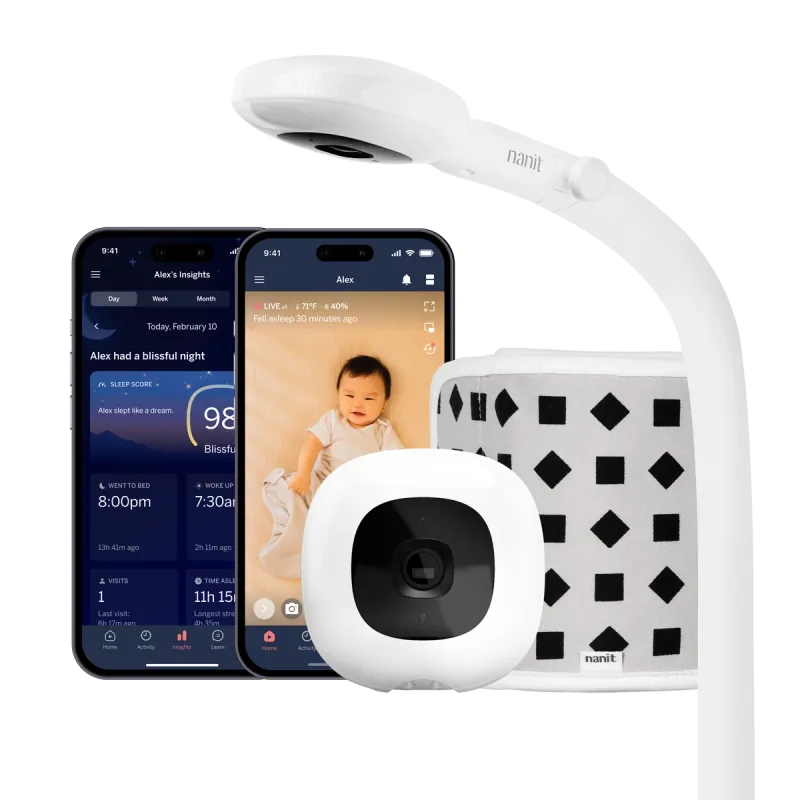
Nanit is a useful comparison point when remote viewing matters more than having a small receiver in your pocket. The Pro camera can be purchased with a wall mount or floor stand, and an optional dedicated display changes the at-home viewing experience. Separate the camera purchase from the Insights decision: live viewing and paid history are different needs. Before choosing a bundle, work out where the mount fits and which caregivers need access. This is a comparison of published features, not a hands-on review.
- Wi-Fi camera with iOS and Android app access
- Wall mount and floor stand packages
- Optional 8-inch display package
- Additional Insights features require a subscription
Where it fits
- Remote caregiver access
- Choice of mounting and viewing packages
What to weigh up
- Account and network setup required
- Budget separately for optional Insights
What you are actually buying
The Smart Baby Monitor System uses Nanit’s Pro camera, but the store offers several combinations. A wall mount keeps floor space clear when the wall and crib placement work together. A floor stand avoids that particular wall installation but needs suitable floor clearance. A camera-plus-display bundle adds a separate viewing device. Start by choosing the physical setup; add software features after you understand that decision.
On the current product listing, the wall-mount package identifies a Pro camera, mount, power equipment, a small Breathing Band and a trial of an Insights plan. Bundle contents and offers can change. Copy the exact package name into a registry note, especially if relatives may buy accessories separately. A photograph showing several accessories is not a reliable packing list.
Core viewing versus optional history
Treat live viewing, stored history, sleep summaries and growth-related features as separate shopping questions. You may want reliable audio while making dinner without ever consulting a weekly report. Another household may use history to compare bedtime routines. Neither family needs to pay for features simply because the app can display them.
Read the current plan comparison from inside the official store or support center, then write down what remains when the trial ends. Note the billing interval as well as any monthly equivalent displayed beside an annual plan. Set a calendar reminder before renewal and decide who in the household owns that decision. This is more useful than memorizing a price from a review that may be out of date next month.
Three scenarios to test in your home
First, try ordinary background listening on the phone you actually use. Check the app’s current instructions for screen locking, battery optimization and notifications; operating-system settings can matter. Next, invite the second caregiver through the supported sharing process and have that person open the live view independently. Finally, check whether the mount provides the overhead view required for the specific feature you want. A travel stand and a fixed overhead installation may not support every feature identically.
Keep these checks separate from any interpretation of sleep data. A graph can be an organizational aid without being a diagnosis. Questions about unusual breathing, feeding, alertness or sleep should be taken to a clinician rather than resolved by changing an app threshold.
When a simpler monitor may suit you
If your main aim is hearing a baby from the kitchen, compare the ownership and setup demands with a direct-viewer monitor. If away-from-home viewing is central to your routine, Nanit’s account-based approach becomes more relevant. An optional dedicated display may help a household that dislikes keeping a phone on the nightstand, but include it in the full purchase cost. The best baby monitors guide shows concrete alternatives with their real product photographs and official links.
Start with the official model and package
Nanit's current store calls the package the Smart Baby Monitor and still refers to its Pro camera. Go directly to the official monitor product page to check the camera and mount included in a listing. Retailer bundles can contain different accessories even when the main camera name looks identical. Compare the actual contents, not only the headline photograph.
Write down the model, mount and any included trial. That small step is particularly helpful when adding a monitor to a registry, where one person may buy the camera while someone else selects a stand. A clearly specified package reduces duplicate accessories and compatibility surprises.
Decide whether the app fits your household
Nanit Pro centers viewing around its companion app. Consider whose phone will be available during naps, whether both caregivers want access, and what happens when a phone needs charging or is being used for a call. Work through those ordinary situations before paying for extra features.
Nanit also offers a camera package with an eight-inch dedicated display. If you want a separate screen beside your bed, compare that package and include the display in your budget. Do not assume an old tablet or a particular smart display will provide every feature indefinitely; confirm current compatibility in official documentation.
Understand the optional insights
Nanit describes additional sleep information under its Insights plans. Check exactly which reports, history and alerts are included in the current plan, what remains available without it, and what happens when a promotional trial expires.
Ask yourself whether you would use a weekly pattern review or mainly glance at live video. A detailed dashboard can be useful to one family and unnecessary to another. Decide before starting a trial which features you consider essential, then set a reminder to review the plan before renewal. Avoid interpreting consumer-generated charts as a diagnosis or as a reason to delay medical advice.
Plan the mount and room layout
Compare the floor stand and wall mount against your actual furniture arrangement. Check that the chosen position provides the view required for the features you want, and that installation follows the instructions supplied with that mount. An overhead picture in advertising is not a substitute for the placement guide.
Think ahead to lowering the crib mattress and moving the crib for cleaning. Make sure the mount remains secure and cords remain inaccessible. Confirm the required clearances with Nanit rather than copying another family's setup from a photograph.
Questions to answer before checkout
Put the following in a note you can share with another caregiver:
- Which current camera and mount are we purchasing?
- Which phones or viewing devices will we use?
- Which features require an ongoing subscription?
- How will a babysitter receive and lose access?
- What is the return policy if our home network performs poorly?
During the return period, try the features you actually expect to use, including nighttime viewing, background audio and account sharing. Review current support instructions if something behaves differently from an older review. The strongest reason to choose Nanit is a good fit between its workflow and your needs, rather than the expectation that more data will remove every uncertainty of caring for a baby.
A few more details
Your questions, answered
Does Nanit require a subscription?
Nanit says a subscription is not required for core viewing and other basic features. Optional Insights features and history can require a paid plan; check the current plan for what you want.
Should I choose the Nanit floor stand or wall mount?
Choose the manufacturer-approved option that fits your room and its placement requirements. Consider furniture clearance, cord routing and future crib adjustments.
Is the eight-inch display included with every Nanit package?
No. Camera-only and camera-plus-display packages are separate choices on the official listing. Read the selected package contents rather than assuming the display in a photograph is included.
What should I check about an Insights trial?
Check the trial length, renewal date, billing interval and which features remain afterward. Decide whether the optional history and reports are useful before the renewal.
Sources & product information
Follow the original sources for current product details, instructions, and guidance.